Validators
A Validator node requires certain level of minimum recommended hardware that is shown below, derived from the official information here:
- Processor: any modern 64 bit processor (Intel Ice Lake or newer, or AMD Zen3 or newer).
- Cores: 8 cores at a frequency of at least 3.4GHz. Multithreading disabled.
- Memory: 32GB DDR4 RAM, preferably with error corrections (ECC).
- Storage: 2TB NVMe SSD (pruned blockchain database is currently around 870GB).
- Network: 500Mbps symmetric (1:1) with low latency (less than 150ms to several peers).
- Traffic: 500GB/day, or unlimited if possible (current volume around 10TB/month).
- Firewall: ports 30333 (or custom) must be open for incoming connections.
These minimum requirements may increase when the chain gets more traffic due to improved adoption and transactional demand.
What is a validator node
A validator node is one of the most important building block of a blockchain network, in the Polkadot ecosystem, validators are in charge of both: the production and the finalization of blocks for the blockchain. Thus, it is of the utmost importance that every operator running validator nodes take their responsibility very seriously.
These nodes connect to others in the network via peer-to-peer (p2p) protocols. Like in the diagram below:
Configure Validator Service
The systemd service file needs to include all the additional configuration for the validator in the diagram above, as well as provide public advertisement of the addresses where the services will be available, this is done by specifying the following:
# Edit the systemd service file to add listening ports and protocols
sudo nano /etc/systemd/system/polkadot1.service
and enter the following sample content for an Polkadot validator
[Unit]
Description=Polkadot Node
After=network-online.target
Wants=network-online.target

[Service]
User=polkadot
Group=polkadot
ExecStart=/usr/local/bin/polkadot \
  --validator \
  --name MY_POLKADOT_VALIDATOR \
  --base-path '/var/lib/polkadot/polkadot1' \
  --port 30333 \
  --database paritydb \
  --enable-pruning \
  --state-pruning 1000 \
  --blocks-pruning archive-canonical \
  --telemetry-url 'wss://telemetry.polkadot.io/submit/ 1' \
  --sync warp

Restart=always
RestartSec=120

[Install]
WantedBy=multi-user.target
Please note that this service file makes use of the following special flags:
--validator: IMPORTANT! without this flag your node will not participate in consensus.--state-pruning: a typical value of1000has been conservatively acceptable for a validator, this is equivalent to state history of around 1h40m. However values as low as 256 (25 minutes) are permissible.--database: specifies that the database typeparitydbwill be used, this would make the node slightly more performant than the alternativerocksdb.- The rest of the flags are there for convenience and performance.
Create session keys
This validator node is now ready to receive session keys, which will be needed to declare its validation intentions on-chain, and will be the ones applied to every block block signature where it participates.
The creation of session keys is a process that depends from the current runtime, so it is of utmost importance that the following commands are only executed once the node has fully synced to the current height of the blockchain
The creation of these keys is performed against the RPC (Remote Procedure Call) port of the node itself. This port is not open to the exterior so you must be logged in the node's machine to execute it:
# Create session keys (IMPORTANT: Take note of the keys returned by this command)
sudo curl -H "Content-Type: application/json" -d '{"id":1, "jsonrpc":"2.0", "method": "author_rotateKeys", "params":[]}' http://localhost:9944
# Check that the keys exists in the appropriate directory
ll /var/lib/polkadot/polkadot1/chains/polkadot/keystore
the results would look like this:
$sudo curl -H "Content-Type: application/json" -d '{"id":1, "jsonrpc":"2.0", "method": "author_rotateKeys", "params":[]}' http://localhost:9944
0x745d7b5d197592ee8xxxxxxxxxxxf9e2bb1928ca36d34f8f455dd95a7d4a505e78c1a2d946f6d0076xxxxxxxxxx904a90d610659dd275c3ef9d7cd070c637a41c

$ ll /var/lib/polkadot/polkadot1/chains/polkadot/keystore
total 32
drwxr-xr-x 2 polkadot polkadot 4096 May 25  2024 ./
drwxr-xr-x 5 polkadot polkadot 4096 Apr 16  2024 ../
-rwxr-xr-x 1 root     root       78 May 25  2024 6173676e60052f5fbf26e42xxxxxxxxxxxxxxxxxxxxxxdb59b25b57f80da17dc85692e70*
-rwxr-xr-x 1 root     root       75 May 25  2024 61756469d8543d9f2b924xxxxxxxxxxxxxxxxxxx05cc818b908a252724875ce90b33333a*
-rwxr-xr-x 1 root     root       82 May 25  2024 62616265607e87axxxxxxxxxxxxxxxxxxxxxxxxxx329952a2ef95a7173a66db78a3ce754*
-rwxr-xr-x 1 root     root       79 May 25  2024 6265656602c6f9d6xxxxxxxxxxxxxxxxxxxxxxxxxxxxxxxxxxxxxbfcbc18a043aac4ab0b*
-rwxr-xr-x 1 root     root       80 May 25  2024 6772616ea8dxxxxxxxxxxxxxxxxxxxxxxxxxxxxxxxxxxxxxxxxxxxxxx112d9fcff7c6a76*
-rwxr-xr-x 1 root     root       85 May 25  2024 70617261709fxxxxxxxxxxxxxxxxxxxxxxxxxxxxxxxxxxxxxxb781f5c3391db28d8cb802*
Note that six (6x) files were created (may not be displayed in the same order):
- babe: block production in the relaychain
- grandpa: block finalisation in the relaychain
- paraValidator: validation of blocks from parachain
- paraAssignment: assigment of blocks from parachain
- authorityDiscovery: discovery of peer validators
- beefy: bridging blocks finalisation.
However, also note that they are owned by root and this may cause some access problems. In order to avoid these, let's change owner and set the permissions appropriately.
# Finally change ownership and permissions
chown -R polkadot:polkadot /var/lib/polkadot/polkadot1/chains/polkadot/keystore
chmod 600 /var/lib/polkadot/polkadot1/chains/polkadot/keystore/*
It is very important that you take note of the session keys produced by the author_rotatekeys method, and that you keep it as secure as any other mission-critical password or passphrase. This information is highly sensitive.
Do not copy session keys between nodes, if any two nodes with the same session keys try to participate in consensus at the same time this may create a double-signature error, which is penalised with a hefty slash to you stake, and the stake of all your nominators.
in case you lose or fail to secure your session keys, just delete these files from the node's database directory, and generate brand new keys again. This time, make sure you take note and store them securely
Add self-stake
Now the final step happens entirely on-chain so you need to go to the official wallet Polkadot Developer Interface or to any community copies to complete the procedures:
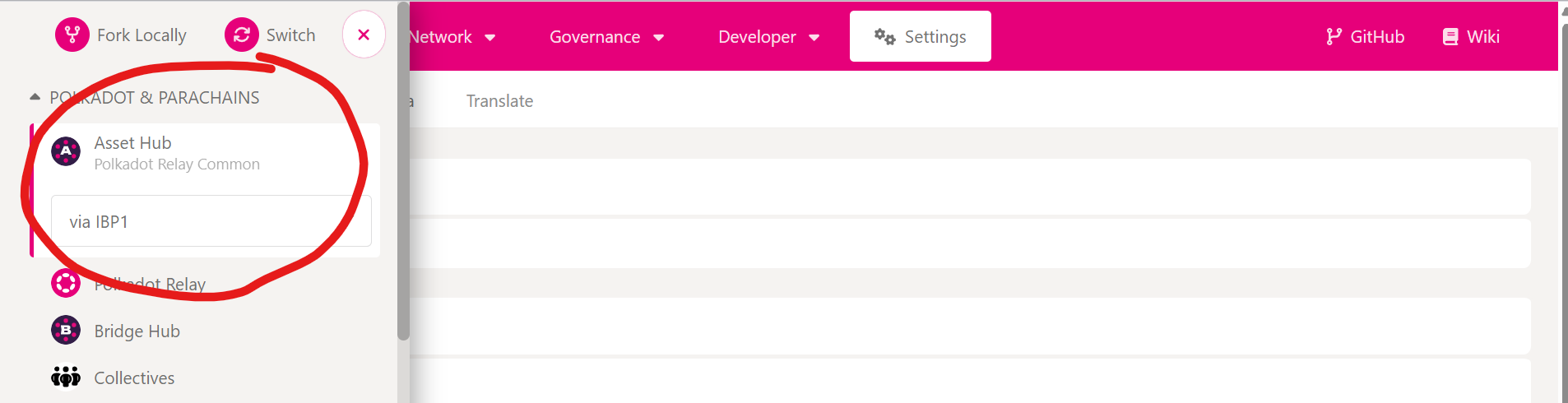
- Connect to the Polkadot Asset Hub chain
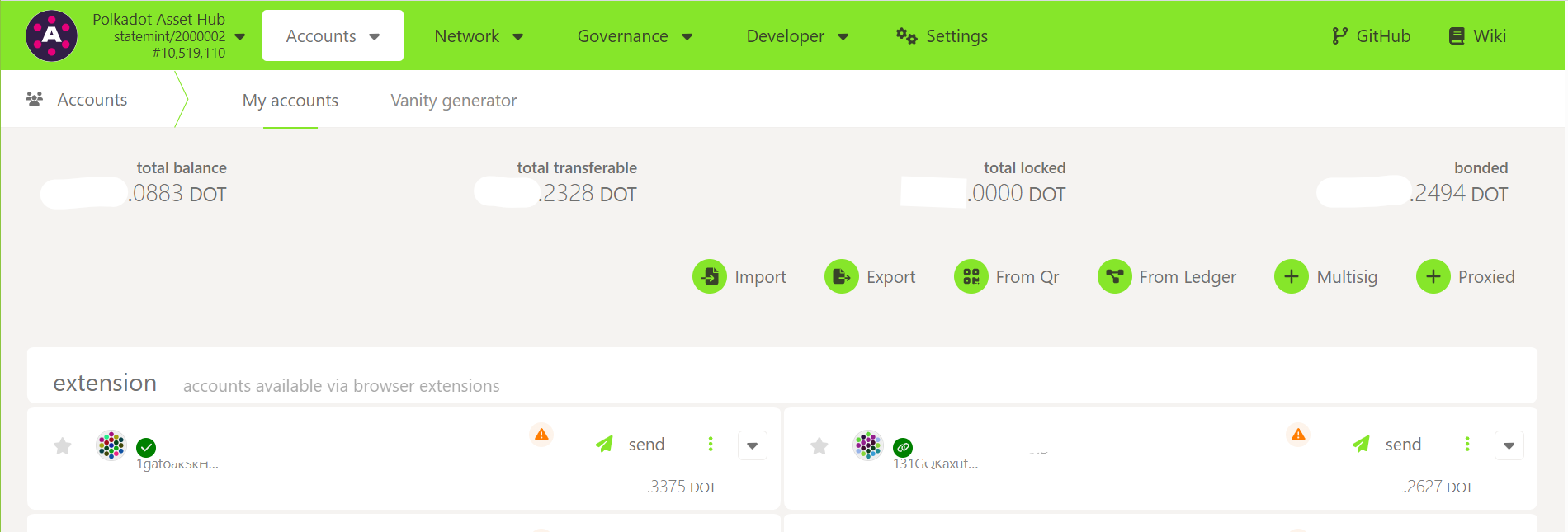
- Add all your accounts to the "Accounts" tab, preferably with the help of the Polkadot Developer Signer
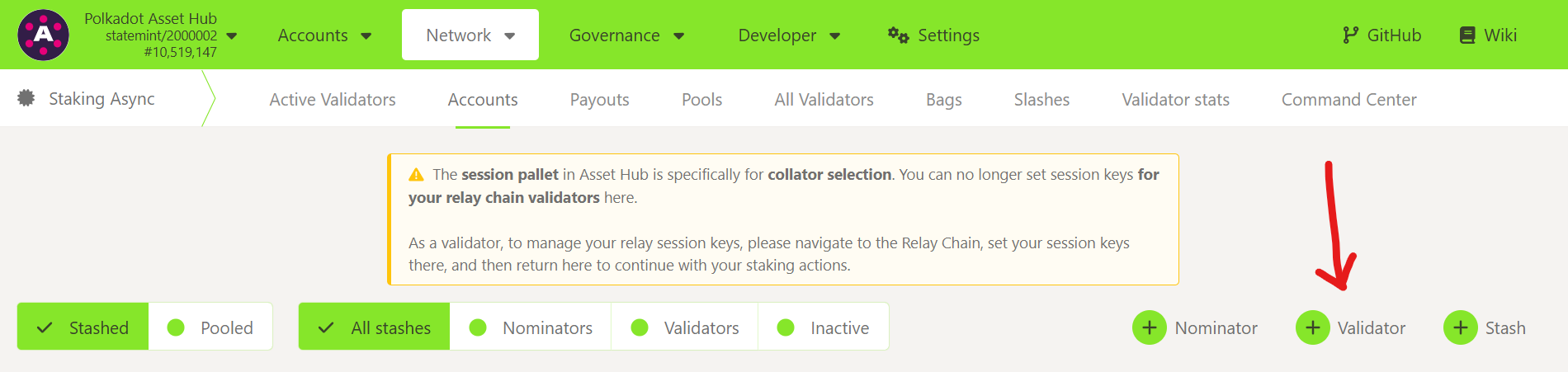
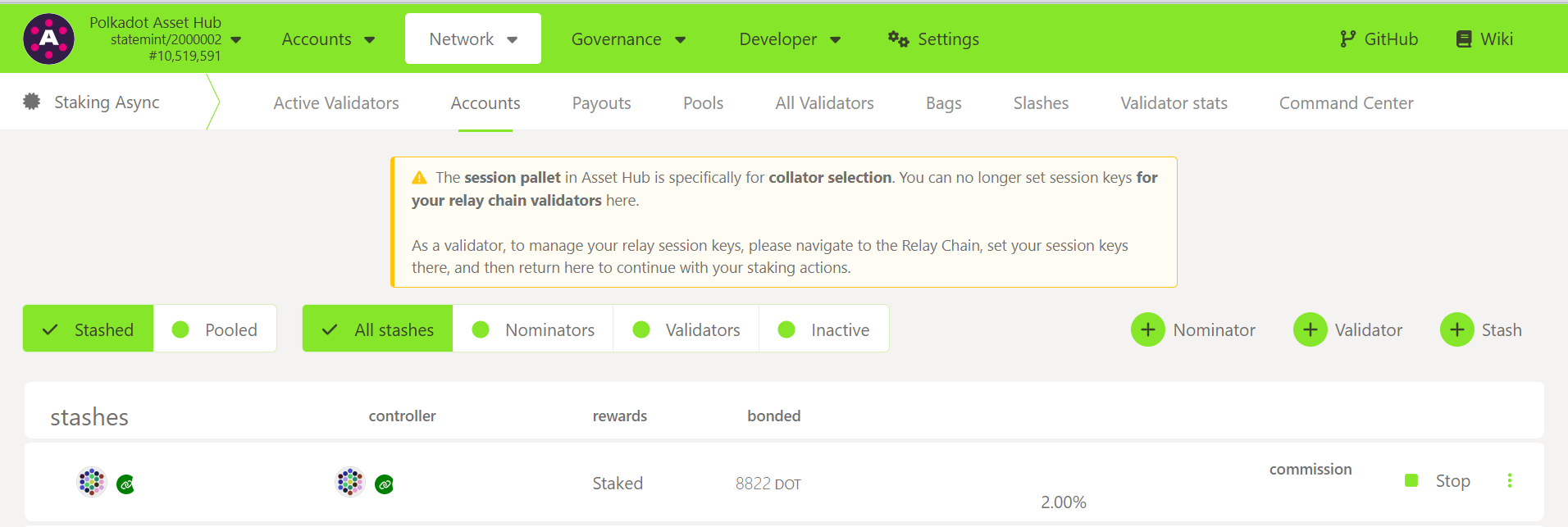
- Then go to the "Network -> Staking Async -> Accounts" where all the magic will happen
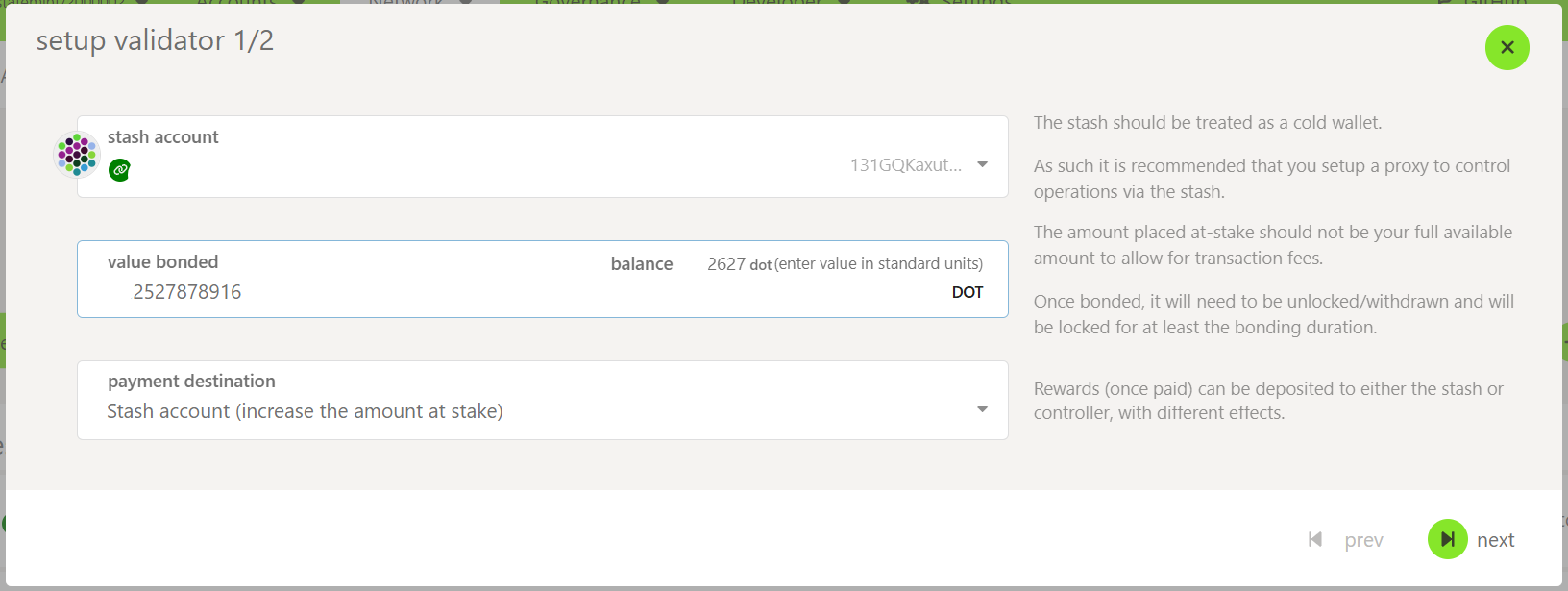
- Create your new "Validator" from one of the accounts you just imported into the wallet.
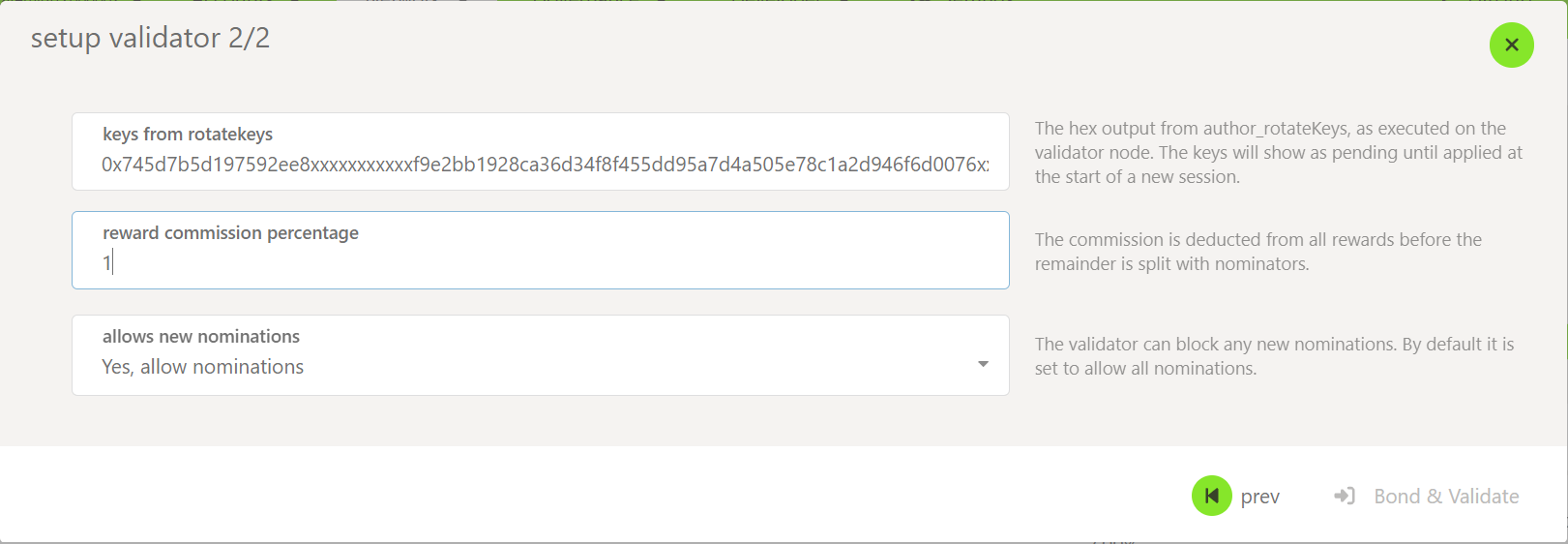
- After adding the funds, you are asked to add the session keys of your validator and your preferences:
- Now you will see your validator fully set up in the screen:
Monitor your Validator
Do not forget to monitor both: the availability and the performance of your validator, these are the most important aspect to attract and retain those juicy external nominations which will compound your validation rewards!
the monitoring of the validator nodes is not covered by this guide, but please feel free to ask your peers for recommendations, they will be more than happy to assist!